> For the complete documentation index, see [llms.txt](https://docs.bucketprotocol.io/llms.txt). Markdown versions of documentation pages are available by appending `.md` to page URLs; this page is available as [Markdown](https://docs.bucketprotocol.io/user-guides/position-management.md).
# Position Management
Manage an open CDP from your Dashboard. Every action shows an after-action simulation (CR and Liquidation Price). Submissions require CR ≥ MCR(liquida.
## Where to manage
* Open **Dashboard page** and locate your position card.
* Click **Manage** on the position card.
* In the Manage panel, use the tabs:
* **Deposit**
* **Withdraw**
* **Borrow**
* **Repay**
* **Repay with USDB**
* **Repay with collateral**
***
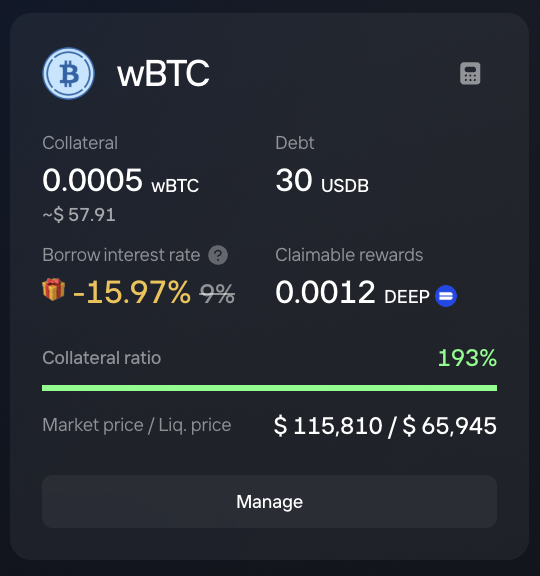
## What the position card shows
* **Collateral amount & value**, **Debt**, and fixed **interest rate.**
* **CR (Collateral Ratio)** with a **health bar**
* **Market Price** and **Liquidation Price**
**Health bar colors:**
* **Green** = conservative
* **White** = normal
* **Yellow** = aggressive
* **Red** = very risky
* Liquidation label = Minimal Collateral Ratio of the Collateral type
***
## Actions
> The after-action simulation appears on every tab to preview CR and Liquidation Price before you confirm.
### Deposit(add collateral)
1. Go to **Deposit** and enter the amount to add.
2. Review the after-action **CR** and **Liquidation Price**.
3. Confirm(Deposit).
**Effect:** CR increases; Liquidation Price moves lower (safer).
***
### Borrow more USDB
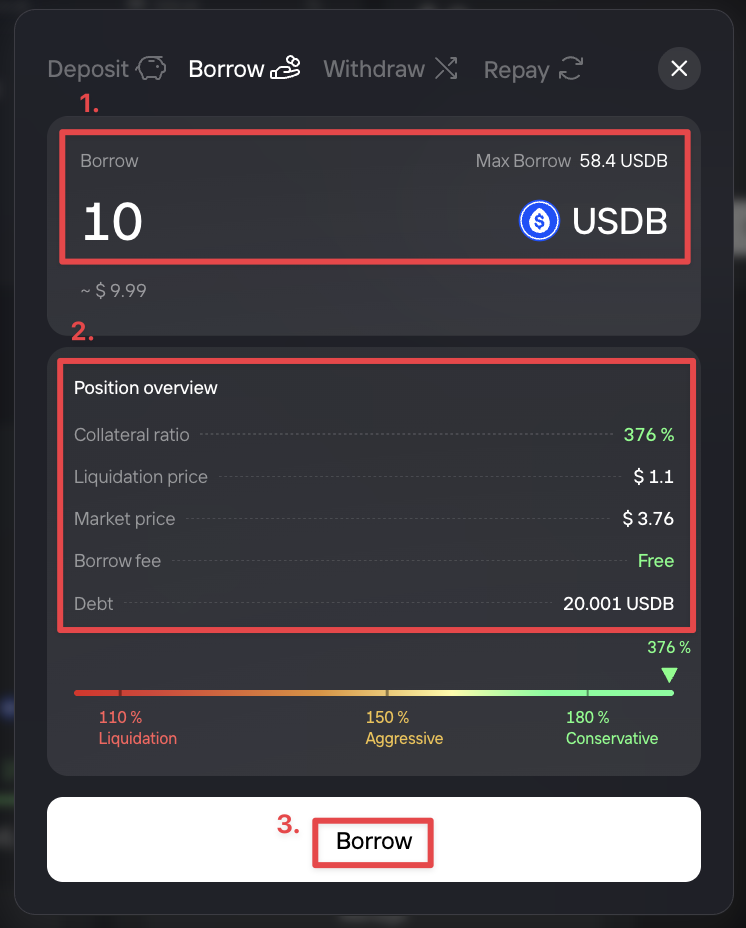
1. Go to **Borrow** and enter the amount of **USDB** you want to borrow.
2. Review the after-action **CR** and **Liquidation Price (CR must remain ≥ MCR(Liquidation)**.
3. Confirm(Borrow).
**Effect:** Debt increases; CR decreases; Liquidation Price moves higher (riskier). *Fixed interest rate is based on debt amount*
***
### Withdraw collateral(partially)
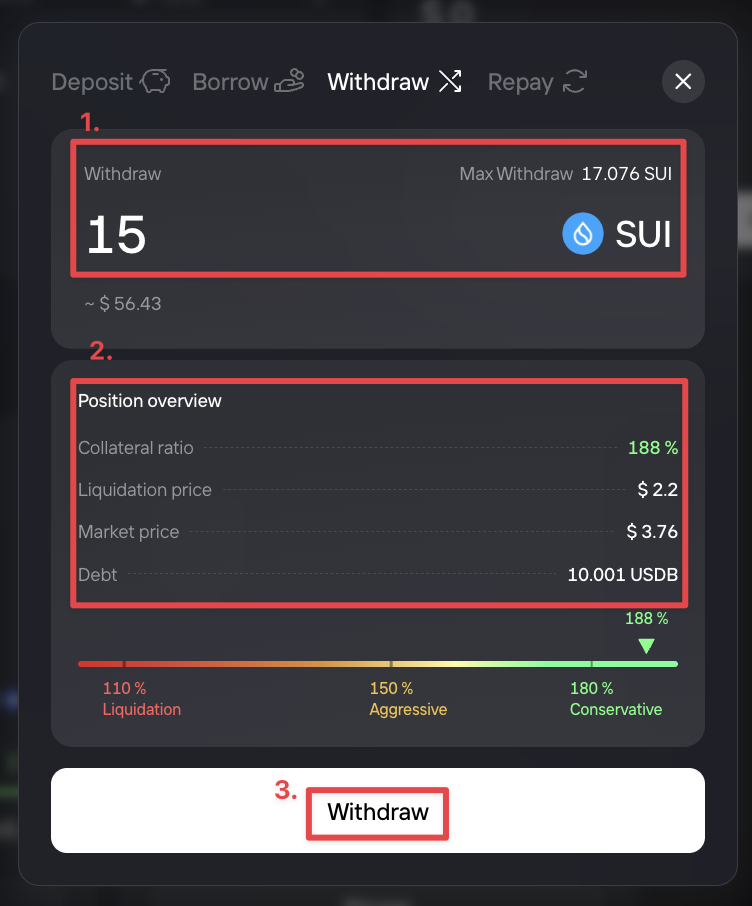
1. Go to **Withdraw** and enter the amount to take out.
2. Review the after-action **CR** and **Liquidation Price (CR must remain ≥ MCR(Liquidation)**.
3. Confirm(Withdraw).
**Max withdraw note:** the UI shows a **max-withdraw estimate** that trends your CR close to the MCR line.
**Effect:** CR decreases; Liquidation Price moves higher (riskier).
***
### Repay debts
#### ***Repay with USDB***
* Enter the amount of **USDB** to repay and confirm.
* **Max repay** behavior:
* If wallet USDB balance ≥ total debt, Max fills the **entire outstanding debt** (including real-time interest).
* Otherwise, Max uses your **full wallet balance**.
* **Partial repay** is supported.
**Effect:** Debt decreases; collateral remain the same. CR increase(Safer).
***Repay with collateral***
* For supported assets, sell a portion of collateral into **USDB** and repay in one flow.
* The modal previews: **collateral to sell → USDB repaid → new CR**.
* Under the hood, the protocol routes the steps atomically; availability depends on on-chain DEX liquidity.
**Effect:** Debt decreases; collateral also decreases. CR typically **improves** if the debt reduction is proportionally larger than collateral sold.
***
### Close position
**Close** fully repays the position and returns all remaining collateral to your wallet in a single transaction. Choose one of the two paths:
* **Close — Repay with USDB**
* **Requirement:** your wallet’s USDB balance must be **≥ total debt**.
* **What happens:** repays the **entire** debt using your USDB and withdraws **100% of the collateral** back to your wallet.
* **Close — Repay with collateral**
* **Availability:** always available(Slippage < your setting).
* **What happens:** sells a **portion of collateral** into USDB, repays **all** debt, then withdraws the **remaining collateral** to your wallet.
* The modal shows a preview: **collateral used(to sell) → USDB repaid → collateral left**.
***
### Examples
**Shared assumptions**
* Collateral: **1,000 SUI**
* Market price: **$5.00** per SUI → Collateral Value **$5,000**
* Debt: **4,000 USDB**
* **MCR (Liquidation) = 110% (1.10)**
* Baseline: **CR = 5,000 / 4,000 = 1.25 (125%)**
* Liquidation Price = (1.10 × 4,000) / 1,000(SUI) = $4.40 per SUI
**A) Deposit 200 SUI**
* New collateral = **1,200 SUI** (value **$6,000**)
* New **CR = 6,000 / 4,000 = 1.50 (150%)**
* New Liquidation Price = (1.10 × 4,000) / 1,200(SUI) ≈ $3.67 per SUI
**B) Repay with collateral 500 USDB**
* At $5.00/SUI (ignoring routing fees), sell **\~100 SUI** → **\~500 USDB** to repay.
* New collateral = **900 SUI** (value **$4,500**); New Debt = **3,500 USDB**
* New **CR = 4,500 / 3,500 ≈ 1.286 (128.6%)**
* New Liquidation Price = (1.10 × 3,500) / 900 ≈ $4.28 per SUI